Minimalist vs Maximal: Finding Your Browser Style (Complete Guide)
Discover whether a minimalist or maximalist browser setup suits you best. Compare approaches, see examples, and learn how to design your ideal new tab experience.
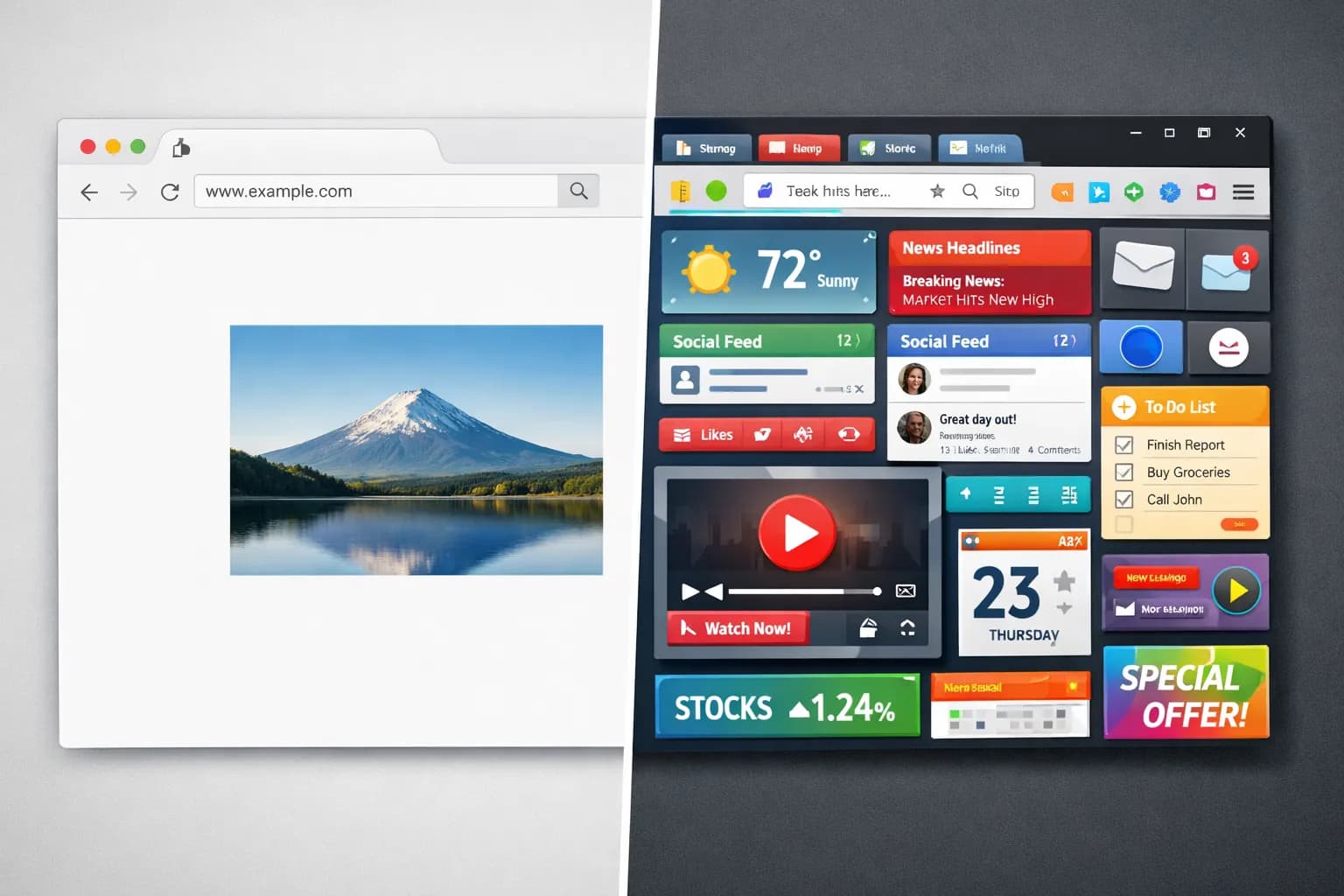
When it comes to browser aesthetics, two philosophies dominate: minimalism (less is more) and maximalism (more is more). Neither is objectively better — the right choice depends on how you work, what you need, and what inspires you.
This guide helps you find your ideal browser style.
Understanding the Spectrum
The Minimalist Philosophy
Core belief: Simplicity enables focus. Remove everything unnecessary.
Characteristics:
- Clean, uncluttered interface
- Few or no visible widgets
- Simple or solid backgrounds
- Maximum whitespace
- Information on demand only
Benefits:
- Zero visual distraction
- Fastest load times
- Peaceful, calm feeling
- Clear intention space
The Maximalist Philosophy
Core belief: Rich environments inspire and inform. Embrace visual abundance.
Characteristics:
- Multiple visible widgets
- Detailed, complex imagery
- Information-dense layouts
- Dynamic, changing elements
- Personality and expression
Benefits:
- Inspiration from beauty
- Quick information access
- Stimulating environment
- Personal expression
The Spectrum Between
Most people fall somewhere in between:
| Level | Widgets | Wallpaper | Information |
|---|---|---|---|
| Ultra-minimal | None | Solid color | Time only |
| Minimal | 1-2 | Simple scene | Essentials |
| Balanced | 3-4 | Nature photo | Useful tools |
| Feature-rich | 5+ | Detailed image | Everything visible |
| Maximal | All | Complex/busy | Information dense |
The Minimalist Approach
Who It's For
Minimalism suits you if you:
- Get easily distracted by visual clutter
- Prefer clean, quiet environments
- Work on focus-intensive tasks
- Value simplicity over features
- Find peace in empty space
- Want maximum browser speed
Building a Minimalist Setup
Step 1: Strip to essentials
Ask for each element: "Do I need this visible?"
- Time? Usually yes
- Weather? Maybe (check phone instead?)
- Todos? Maybe (use dedicated app?)
- Notes? Probably not always visible
- Search? Maybe (use URL bar instead?)
Step 2: Choose your background
Minimalist wallpaper options:
| Type | Visual Complexity | Effect |
|---|---|---|
| Solid color | None | Maximum focus |
| Gradient | Very low | Subtle depth |
| Blurred photo | Low | Beauty without detail |
| Simple scene | Medium-low | Calm, not distracting |
Step 3: Reduce visual noise
- Disable animations if possible
- Choose transparent or subtle widgets
- Use consistent, muted colors
- Maximize empty space
Minimalist Examples
The Purist:
- Solid black or white background
- Time only, centered
- No other widgets
- Click to reveal anything else
The Nature Minimalist:
- Simple landscape (sky, horizon)
- Subtle time display
- Glassmorphism overlay
- One visible widget maximum
The Functional Minimalist:
- Clean background
- Time and one productivity widget
- Search bar hidden until needed
- Information density: low
→ Color choices for minimalism: Color Psychology Guide
The Maximalist Approach
Who It's For
Maximalism suits you if you:
- Find inspiration in rich environments
- Like having information at a glance
- Enjoy visual variety and stimulation
- Express yourself through customization
- Don't get overwhelmed easily
- Want your browser to be a command center
Building a Maximalist Setup
Step 1: Identify all useful widgets
Consider adding:
- Time and date
- Weather with details
- Todo list
- Calendar integration
- Notes
- Pomodoro timer
- Search bar
- Bookmarks
- Quotes/inspiration
- World clocks
Step 2: Choose rich wallpapers
Maximalist wallpaper options:
| Type | Visual Complexity | Effect |
|---|---|---|
| Detailed nature | High | Immersive, inspiring |
| Earth View | High | Awe, perspective |
| Urban/architecture | High | Energy, sophistication |
| Artistic/abstract | Medium-high | Creative, unique |
Step 3: Embrace the dashboard
- Arrange widgets for workflow
- Use transparency for layering
- Enable rotation for variety
- Don't fear the busy aesthetic
Maximalist Examples
The Information Hub:
- Detailed city wallpaper
- Multiple widgets visible
- Weather, todos, calendar, time
- Quick access bookmarks
- Search prominently placed
The Inspiration Board:
- Art or nature wallpaper (rotating)
- Inspirational quotes visible
- Mood-based collections
- Personal photos mixed in
- Rich, changing environment
The Productivity Dashboard:
- Functional background
- All productivity widgets active
- Timer always visible
- Todo list prominent
- Goal tracking displayed
→ Find rich wallpapers: Best Wallpaper Sources
Comparing the Approaches
Productivity Impact
| Factor | Minimalist | Maximalist |
|---|---|---|
| Focus | ★★★★★ | ★★★☆☆ |
| Information access | ★★☆☆☆ | ★★★★★ |
| Mental calm | ★★★★★ | ★★★☆☆ |
| Inspiration | ★★☆☆☆ | ★★★★★ |
| Speed | ★★★★★ | ★★★★☆ |
Use Case Fit
| Work Type | Better Approach | Reasoning |
|---|---|---|
| Deep writing | Minimalist | Fewer distractions |
| Research | Balanced/Maximal | Need quick info access |
| Creative work | Maximalist | Stimulation helps |
| Data analysis | Minimalist | Focus on data, not browser |
| Project management | Maximalist | Dashboard functionality |
| Casual browsing | Either | Personal preference |
Personality Fit
| Trait | Minimalist | Maximalist |
|---|---|---|
| Easily distracted | ✅ Better | May overwhelm |
| Visually oriented | May bore | ✅ Better |
| Information seeker | May frustrate | ✅ Better |
| Simplicity lover | ✅ Better | May annoy |
| Customization enthusiast | Limited | ✅ Better |
Finding Your Balance
The Hybrid Approach
Many users combine elements:
Default minimal, reveal on demand:
- Clean initial view
- Widgets appear on hover/click
- Best of both worlds
- Requires discipline
Contextual switching:
- Minimal setup for focus work
- Richer setup for general browsing
- Different browser profiles
- Time-based switching
Selective maximalism:
- Simple background
- One or two rich widgets
- Most features hidden
- Intentional choices only
Experimentation Framework
Week 1: Try Minimal
- Remove all widgets except time
- Use solid or simple wallpaper
- Note: focus, calm, frustration
- Track: what you miss
Week 2: Try Maximal
- Enable all widgets
- Use detailed wallpapers
- Note: inspiration, overwhelm
- Track: what you actually use
Week 3: Find Your Balance
- Add back only what you missed
- Choose wallpaper complexity that works
- Adjust based on observations
- Document your ideal setup
Questions to Guide You
Answer honestly:
-
When I open a new tab, I want to feel:
- Calm and focused → Minimal
- Inspired and informed → Maximal
- Depends on the moment → Balanced
-
Visual clutter makes me:
- Anxious, distracted → Minimal
- Stimulated, engaged → Maximal
- Neutral → Balanced
-
I primarily use my browser for:
- Deep work, single tasks → Minimal
- Multi-tasking, research → Maximal
- Mix of both → Balanced
-
My ideal workspace is:
- Clean desk, bare walls → Minimal
- Rich, decorated, full → Maximal
- Somewhere between → Balanced
Style by Work Mode
Focus Mode (Minimal)
When you need deep concentration:
| Element | Recommendation |
|---|---|
| Wallpaper | Solid or simple |
| Widgets | Time only |
| Distractions | Zero |
| Goal | Complete focus |
Setup tip: Create a dedicated "focus" collection with minimal wallpapers.
Work Mode (Balanced)
For regular productive work:
| Element | Recommendation |
|---|---|
| Wallpaper | Calming nature |
| Widgets | Time, maybe todos |
| Distractions | Minimal |
| Goal | Productive calm |
→ Wallpaper rotation: Seasonal Ideas
Browse Mode (Richer)
For research and general browsing:
| Element | Recommendation |
|---|---|
| Wallpaper | Varied, interesting |
| Widgets | Search, bookmarks, weather |
| Distractions | Acceptable |
| Goal | Information access |
Break Mode (Maximalist)
For mental restoration:
| Element | Recommendation |
|---|---|
| Wallpaper | Beautiful, inspiring |
| Widgets | Whatever brings joy |
| Distractions | Welcome |
| Goal | Restoration, inspiration |
Implementing in Dream Afar
Creating a Minimalist Setup
-
Settings → Widgets
- Disable everything except time
- Adjust time size and position
-
Settings → Wallpaper
- Choose "Minimal" or solid colors
- Or select simple nature scenes
-
Settings → Interface
- Hide search bar
- Minimize visible controls
Creating a Maximalist Setup
-
Settings → Widgets
- Enable desired widgets
- Position for workflow
-
Settings → Wallpaper
- Choose "Earth View" or detailed collections
- Enable daily rotation
-
Settings → Interface
- Show quick access features
- Enable all available information
Creating Mode-Based Profiles
While Dream Afar doesn't have profiles, you can:
- Save favorite wallpapers for each mode
- Learn which collections suit which moods
- Manually adjust widgets when switching modes
- Use keyboard shortcuts where available
Related Articles
- Beautiful Browser: How Aesthetics Boost Productivity
- AI Wallpaper Curation Explained
- Best Wallpaper Sources for Your Desktop
- Color Psychology in Workspace Design
- Seasonal Wallpaper Rotation Ideas
Find your perfect style today. Install Dream Afar free →
Try Dream Afar Today
Transform your new tab into a beautiful, productive dashboard with stunning wallpapers and customizable widgets.